


I've been diving since the late 1970s, back when dive tables were the only option and bottom times were calculated with waterproof slates and a lot of hope. When dive computers first appeared, I was skeptical—seemed like another gadget trying to solve problems we'd already figured out. Four decades and about 8,000 dives later, I can tell you that dive computers are the single most significant safety advancement in recreational diving history. They're not optional anymore, not if you're serious about diving safely and getting the most out of your time underwater.
What Are Dive Computers?
A dive computer is a wrist-mounted or console-integrated device that continuously tracks your depth, bottom time, and nitrogen absorption throughout a dive, calculating your no-decompression limits in real time based on decompression algorithms. Unlike the old paper dive tables that treated every dive as a square profile (you went straight to your maximum depth and stayed there), dive computers account for your actual depth changes every few seconds, giving you a much more accurate picture of your nitrogen loading.

Here's the thing: your body doesn't absorb nitrogen the way dive tables assume. When you're swimming around a reef, you're constantly changing depth—deeper over the sand, shallower over the coral heads. A dive computer tracks all of that, adjusting your allowable bottom time accordingly. I've seen divers using tables call a dive at 35 minutes when their computer-wearing buddy has another 20 minutes of no-decompression time remaining on the same profile. That's real time underwater you're giving up.
The computer does this by monitoring depth via a pressure transducer and running continuous calculations through its decompression algorithm—mathematical models like Bühlmann ZHL-16C or RGBM that predict how nitrogen saturates and desaturates from various tissue compartments in your body. Modern dive computers also track surface intervals, plan repetitive dives, store your dive log, and handle multiple gas mixes if you're diving nitrox or technical blends.
How Dive Computers Work
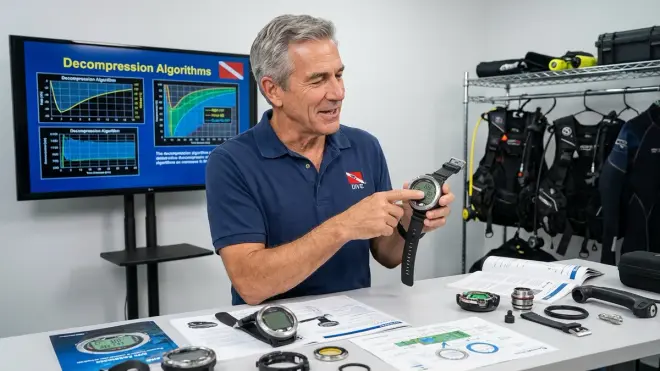
The core of any dive computer is a pressure sensor, typically a silicon strain gauge or piezoelectric transducer, that measures ambient water pressure to determine depth. Since water pressure increases by approximately one atmosphere every 33 feet (10 meters) in saltwater, the computer converts this pressure reading into depth with remarkable accuracy—usually within ±1 foot at recreational depths.
Every few seconds (typically 1-4 second intervals depending on the model), the computer takes a new depth reading and feeds it into its decompression algorithm. The algorithm maintains what's called a "tissue model"—a mathematical representation of how nitrogen is being absorbed into multiple theoretical tissue compartments in your body. These compartments represent different tissues (muscle, blood, fat, nervous tissue) that absorb and release nitrogen at different rates. Fast tissues equilibrate quickly but also off-gas quickly during ascent. Slow tissues take much longer to saturate but hold nitrogen longer during your surface interval.
The computer tracks nitrogen loading for all these compartments simultaneously. As you descend, the partial pressure of nitrogen in your breathing gas increases, and the computer calculates how much nitrogen is being absorbed by each tissue compartment based on your current depth and time. As you ascend or move to shallower depths, it calculates off-gassing. The computer constantly compares your tissue loading against established decompression limits—essentially asking "how much more nitrogen can this diver absorb before requiring mandatory decompression stops?"
I've watched divers stare at their computers like they're reading hieroglyphics, but the display is actually straightforward once you understand what you're looking at. The main screen typically shows: current depth, elapsed dive time, no-decompression limit (NDL) remaining at your current depth, maximum depth reached, and often tank pressure if it's connected to a wireless transmitter. When your NDL gets low, the computer starts warning you—usually with visual alerts and audible alarms that'll make sure you're paying attention.
The computer also tracks your ascent rate, and this is where I've seen more panicked divers than anything else. Modern algorithms require slow ascents—typically 30 feet per minute or less, with some computers preferring 20 feet per minute. Ascend too fast and you'll get loud beeping and visual warnings. Ignore those warnings enough times and the computer will lock you out, essentially saying "you've violated the algorithm's safety parameters too badly for me to give you reliable data." I tell people: listen to your computer. Those beeps aren't suggestions.
Between dives, the computer continues tracking nitrogen elimination during your surface interval. It's calculating how much nitrogen is off-gassing from all those tissue compartments while you're topside. This is critical for planning repetitive dives—the computer knows exactly how much residual nitrogen you're carrying into your next dive and adjusts your no-decompression limits accordingly. This is light-years better than the old repetitive dive tables with their clunky pressure groups and crude time penalties.
Most dive computers now include additional sensors beyond just depth: water temperature sensors, digital compasses, accelerometers for orientation, and Bluetooth connectivity for downloading your dive logs to smartphone apps. Some integrate with wireless tank pressure transmitters, giving you a complete dive profile with air consumption data. The higher-end technical diving computers can manage multiple decompression gases, calculate optimal gas switches, and plan complex decompression profiles for dives well beyond recreational limits.
Why Dive Computers Matter

Let me be direct: a dive computer significantly reduces your risk of decompression sickness compared to using dive tables, especially on multi-dive days. I've been diving long enough to remember when DCS hits were more common, and I can tell you that the widespread adoption of dive computers has made a measurable difference in diver safety. The real-time multi-level dive tracking means you're getting credit for your actual profile, not an artificially conservative square profile that tables force you to use.
Safety aside, dive computers give you more bottom time. On a typical reef dive where you're spending time at various depths—say, starting at 70 feet on a wreck, moving to 50 feet on the reef, then shallow to 25 feet for your safety stop—you'll often get 15-25% more no-decompression time than the same dive planned with tables. Over a week-long dive trip with 3-4 dives per day, that's hours of extra underwater time. I've never understood divers who spend thousands on a dive vacation and then cheap out on the computer that determines how long they can actually stay down.
Beyond the safety calculations, modern dive computers function as your complete dive log. They record every dive—depth, time, temperature, ascent rates, safety stops, surface intervals—and store it permanently. Download your dives to a logbook app and you've got searchable, graphable data on every dive you've ever done. I've got dives from 2006 stored digitally with complete profiles. Try finding your paper logbook from 2006.
For photographers and videographers, dive computers are essential for time management underwater. When you're focused through a viewfinder, it's incredibly easy to lose track of time and depth. I can't count how many times I've seen photographers overstay their NDL because they were so absorbed in composition that they forgot to check their gauges. A wrist-mounted dive computer with customizable alarms keeps you aware without breaking your concentration. Most modern computers also log your maximum depth and exact dive time, which matters for those rare shots where clients or publications ask for verification of dive conditions.
If you're diving nitrox—and you should be, especially on repetitive dive days—a dive computer is really the only practical way to track your oxygen exposure limits alongside your nitrogen loading. The computer calculates both your oxygen toxicity clock (CNS% and OTU tracking) and your nitrogen limits simultaneously. Try doing that with tables and a slate underwater. Good luck.
Types and Variations of Dive Computers
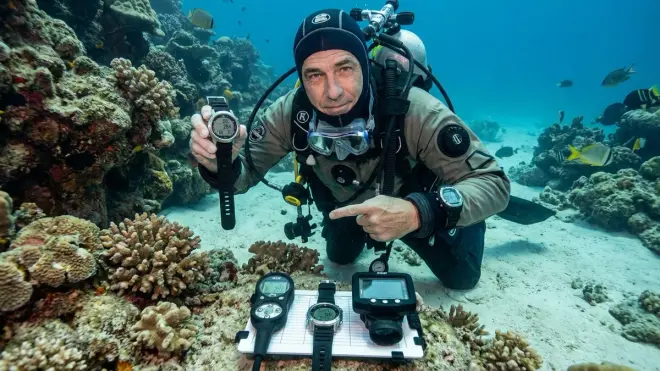
Dive computers come in three main form factors, and each has genuine advantages depending on your diving style. Wrist-mounted computers are by far the most popular and for good reason—they're always visible, don't require console routing, travel light, and many double as everyday watches between dives. Most use a secure strap or bungee mount, though I've seen too many cheap strap systems fail. If you're buying a wrist computer, pay attention to strap quality. I've watched a $600 computer disappear into 90 feet of murky water because someone trusted a $2 buckle.
Console-mounted computers integrate into your regulator console alongside your SPG (submersible pressure gauge) and sometimes a compass. These used to be the standard, and you still see them on rental gear and with older divers who don't like wrist clutter. The advantage is everything's in one place when you look down at your gauges. The disadvantage is you have to physically bring the console up to read it, which gets old after a few hundred dives, and console computers aren't going to serve double-duty between dives. They're also one more hose in your kit.
Watch-style computers are the newest category and they're blurring the lines between dive computers, fitness trackers, and everyday smartwatches. Models like the Shearwater Peregrine and Garmin Descent series pack full dive computer functionality into a watch you'd actually wear to dinner. The screens aren't usually as large as dedicated dive computers, but the multi-sport functionality and smart features make them attractive if you want one device for everything. I'm seeing more and more of these on younger divers.
Within those form factors, you'll find computers ranging from basic recreational models to advanced technical diving computers. Recreational computers handle air and nitrox, track single-gas profiles, and are designed for no-decompression diving within standard sport diving limits (typically 130 feet). Technical computers support multiple gas mixes, trimix calculations, gauge mode, closed-circuit rebreather integration, and full decompression planning with multiple mandatory stops. If you're not doing technical diving, don't pay for technical features you won't use.
Algorithm choice matters more than most divers realize. The two dominant families are Bühlmann-based algorithms (like ZHL-16C with gradient factors) and RGBM-based algorithms (Reduced Gradient Bubble Model). Bühlmann tends to be more liberal and predictable, favored by technical divers. RGBM is more conservative, especially on repetitive and reverse profiles, and it's the basis for most recreational computers from brands like Suunto and Mares. I've dived both extensively. Bühlmann gives you more bottom time; RGBM gives you more safety margin. Your risk tolerance and dive profile should guide your choice, and if you're interested in the mathematical details behind these models, you can read more about decompression algorithms and theory from technical diving resources.
For dive planning and gear considerations, understanding how your computer fits into your overall scuba diving gear setup affects everything from hose routing to pre-dive checks.
Frequently Asked Questions
Do I really need a dive computer as a beginner diver?
Yes, absolutely. I tell every new diver that a dive computer should be one of their first gear purchases, right after a mask that fits properly. Dive computers are easier and safer than learning to use dive tables correctly, they track your actual dive profile rather than a theoretical square profile, and they eliminate most of the math errors I've seen beginners make when planning repetitive dives. The cost of a basic recreational dive computer—around $200–$300 for a solid entry-level model—is far less than the cost of a chamber ride if you misjudge your nitrogen loading.
Can I fly after diving if my dive computer says it's okay?
Your dive computer will display a no-fly countdown after you surface, typically showing 12-24 hours depending on your nitrogen loading and the algorithm's conservatism. Wait the full time the computer indicates, minimum. Most agencies recommend 18-24 hours after your last dive before flying, and I always tell people to err on the conservative side. I've seen divers develop DCS symptoms at altitude because they shaved a few hours off their surface interval to catch an earlier flight. It's never worth it. Your computer's no-fly time is calculated for commercial cabin altitudes around 8,000 feet; if you're driving over mountain passes or taking a smaller aircraft with higher cabin altitude, add extra surface interval time.
What happens if my dive computer dies during a dive?
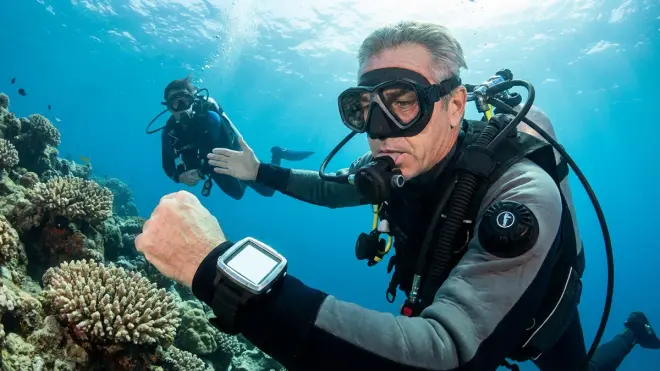
If your computer fails underwater, end the dive immediately and ascend slowly with a proper safety stop. Without a functioning computer, you have no reliable way to know your nitrogen status or remaining no-decompression time. Surface, sit out at least 24 hours, and don't dive again until you have a working computer. This is exactly why I carry a backup computer on every dive—a simple around $200 wrist unit that matches my primary's algorithm. I've had computer failures from flooded batteries, pressure sensor malfunctions, and one memorable failure where the screen just went black at 80 feet. My backup kept the dive going safely.
How often do I need to service or calibrate my dive computer?
Modern dive computers don't require calibration—the pressure sensors are factory-calibrated and stable for the life of the unit. What you do need to maintain are the o-rings and battery. Check and lubricate the battery compartment o-ring annually, or before every dive trip if you're an infrequent diver. Most computers use user-replaceable CR2032 batteries that last 1-2 years depending on usage. Some computers use rechargeable lithium batteries that'll give you 300-500 charge cycles before degrading. Replace the o-ring every time you change the battery—they're 50 cents of insurance against a flooded computer. If your computer shows erratic depth readings, displays errors, or the screen starts to delaminate, send it to the manufacturer for service. For more on maintaining life-support equipment, check out our guide on how to service a scuba regulator for similar preventive maintenance principles.
Can I use the same dive computer for freediving and scuba diving?
Some dive computers are designed for both, but many are not, and you need to verify your specific model's capabilities. Freediving computers track depth and dive time but don't run decompression algorithms or track nitrogen loading the same way scuba computers do. Multi-mode computers will have dedicated freediving and scuba modes—make sure you're in the correct mode before entering the water. I've seen confused divers try to use their freediving computer in gauge mode for scuba and then wonder why they have no NDL data. If you're serious about both disciplines, it's often better to have dedicated computers for each rather than trying to make one unit do everything adequately.
Summary
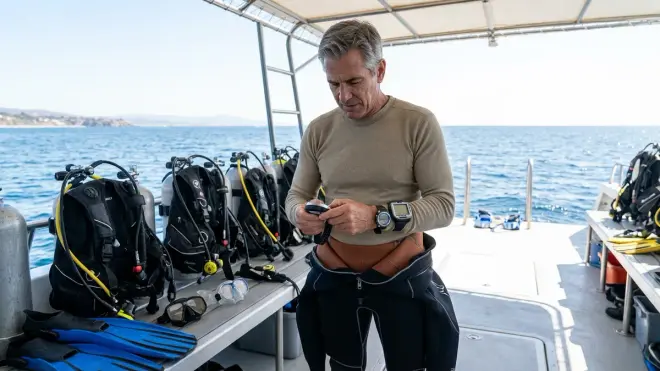
Dive computers have fundamentally changed how we dive, making the sport safer, simpler, and more enjoyable by tracking your actual nitrogen loading in real time and giving you accurate no-decompression limits throughout your dive. After 40-plus years of diving, I can say without hesitation that the computer is the most important piece of gear you'll buy after your mask and regulator—it's literally the device that keeps you from getting bent.
Whether you choose a wrist-mounted unit, a console computer, or a watch-style multi-sport device, make sure it matches your diving style, uses an algorithm you understand, and has a display you can read easily in the conditions you typically dive. Don't skimp on quality, maintain it properly, and for the love of everything salty, carry a backup on any dive beyond recreational shallow depths.
I still carry my dive tables in my dry bag—old habits die hard—but I haven't actually calculated a dive profile with them in probably 15 years. The computer on my wrist does it better, faster, and more accurately than I ever could with a slate and waterproof paper. Trust your computer, understand what it's telling you, and it'll keep you safe on thousands of dives to come. And if you want to dive deeper into selecting the right model for your needs, our guide to choosing a dive computer walks through the decision process step by step.